> ## Documentation Index
> Fetch the complete documentation index at: https://shapely.mintlify.site/llms.txt
> Use this file to discover all available pages before exploring further.

# GeoJSON → Shapely

>  Converts GeoJSON file to Shapely geometry. 

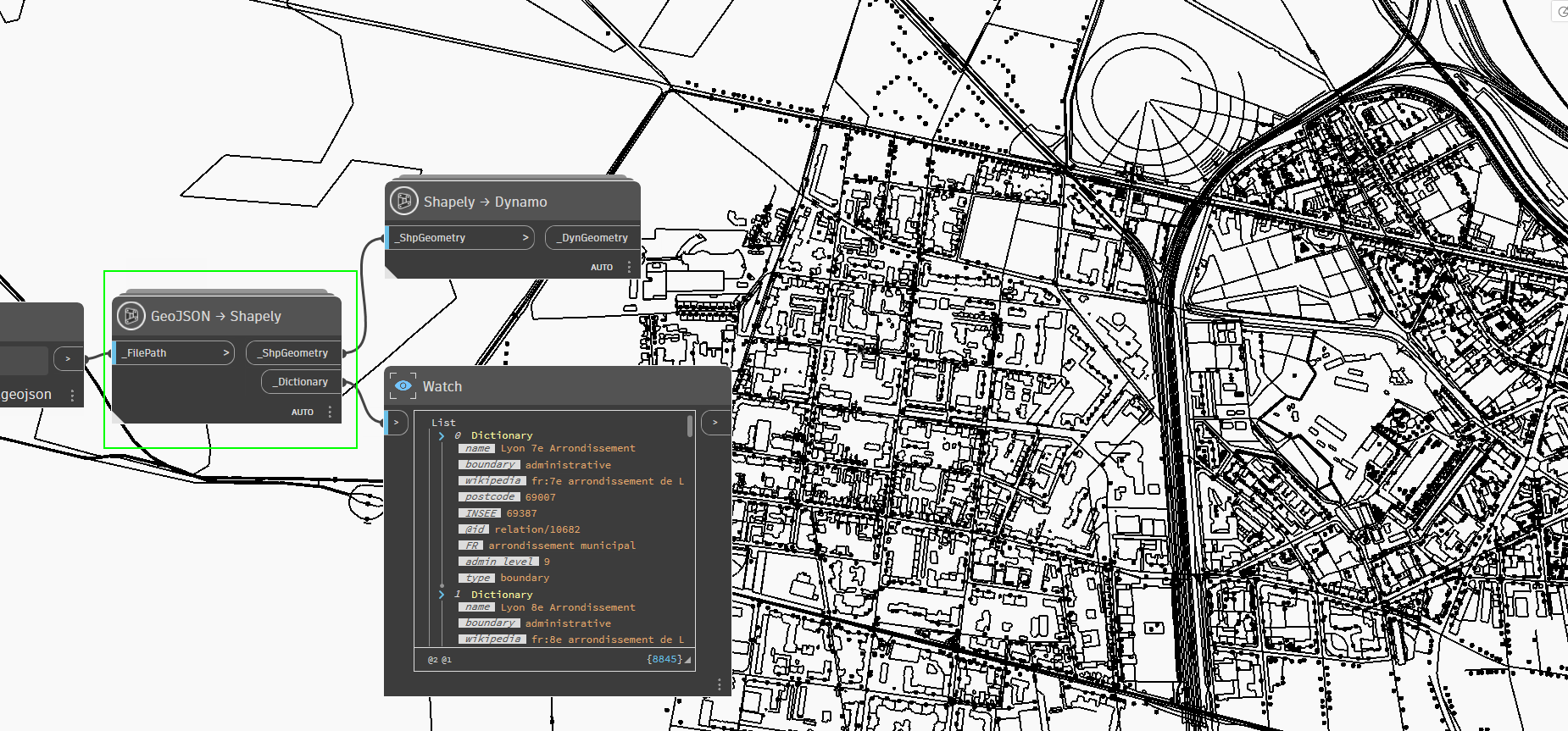
GeoJSON data will come with a **Dictionary**. This way, we can easily identify which line belongs to what. GeoJSON data, sample page [example](https://overpass-turbo.eu/#) 

### An example of transformations

<a href="/images/GeoJSON-Shapely.png" target="_blank">
  <img src="https://mintcdn.com/shapely/s37PquOaBB1jAc7-/images/GeoJSON-Shapely.png?fit=max&auto=format&n=s37PquOaBB1jAc7-&q=85&s=4376453f9c9d75973af5ca4b6ee3cd3a" className="pointer-events-none" style={{ borderRadius: '0.5rem', border: '1px solid rgba(0,0,0,0.1)' }} width="1850" height="863" data-path="images/GeoJSON-Shapely.png" />
</a>

### An example of test

<Frame>
  <a href="https://github.com/DurmusCesur/docs/releases/download/Dyn/Shp_GeoJSON.dyn" download="Shp_GeoJSON.dyn">
    <button className="bg-[#16A34A] text-white px-5 py-1 rounded-md hover:bg-[#15803D] transition-colors">
      Shp\_GeoJSON.dyn
    </button>
  </a>
</Frame>

<Frame>
  <a href="https://github.com/DurmusCesur/docs/releases/download/GeoJSON/Less.Detail.geojson" download="Less.Detail.geojson">
    <button className="bg-gradient-to-r from-blue-600 via-blue-450 to-blue-600 text-white px-6 py-1 rounded-lg shadow-lg hover:bg-gradient-to-l hover:from-blue-500 hover:to-blue-400 transition-all">
      Less Detail.geojson
    </button>
  </a>
</Frame>

<Frame>
  <a href="https://github.com/DurmusCesur/docs/releases/download/GeoJSON/More.Detail.geojson" download="More.Detail.geojson">
    <button className="bg-gradient-to-r from-blue-600 via-blue-450 to-blue-600 text-white px-6 py-1 rounded-lg shadow-lg hover:bg-gradient-to-l hover:from-blue-500 hover:to-blue-400 transition-all">
      More Detail.geojson
    </button>
  </a>
</Frame>

<Frame>
  <a href="https://github.com/DurmusCesur/docs/releases/download/GeoJSON/OnlyBuilding.geojson" download="OnlyBuilding.geojson">
    <button className="bg-gradient-to-r from-blue-600 via-blue-450 to-blue-600 text-white px-6 py-1 rounded-lg shadow-lg hover:bg-gradient-to-l hover:from-blue-500 hover:to-blue-400 transition-all">
      OnlyBuilding.geojson
    </button>
  </a>
</Frame>